The graph drawing program
Over the next couple of lectures I am going walk you through the construction of a fairly complex app. The GraphPad app is an app designed for tablets that implements a drawing program for graphs.
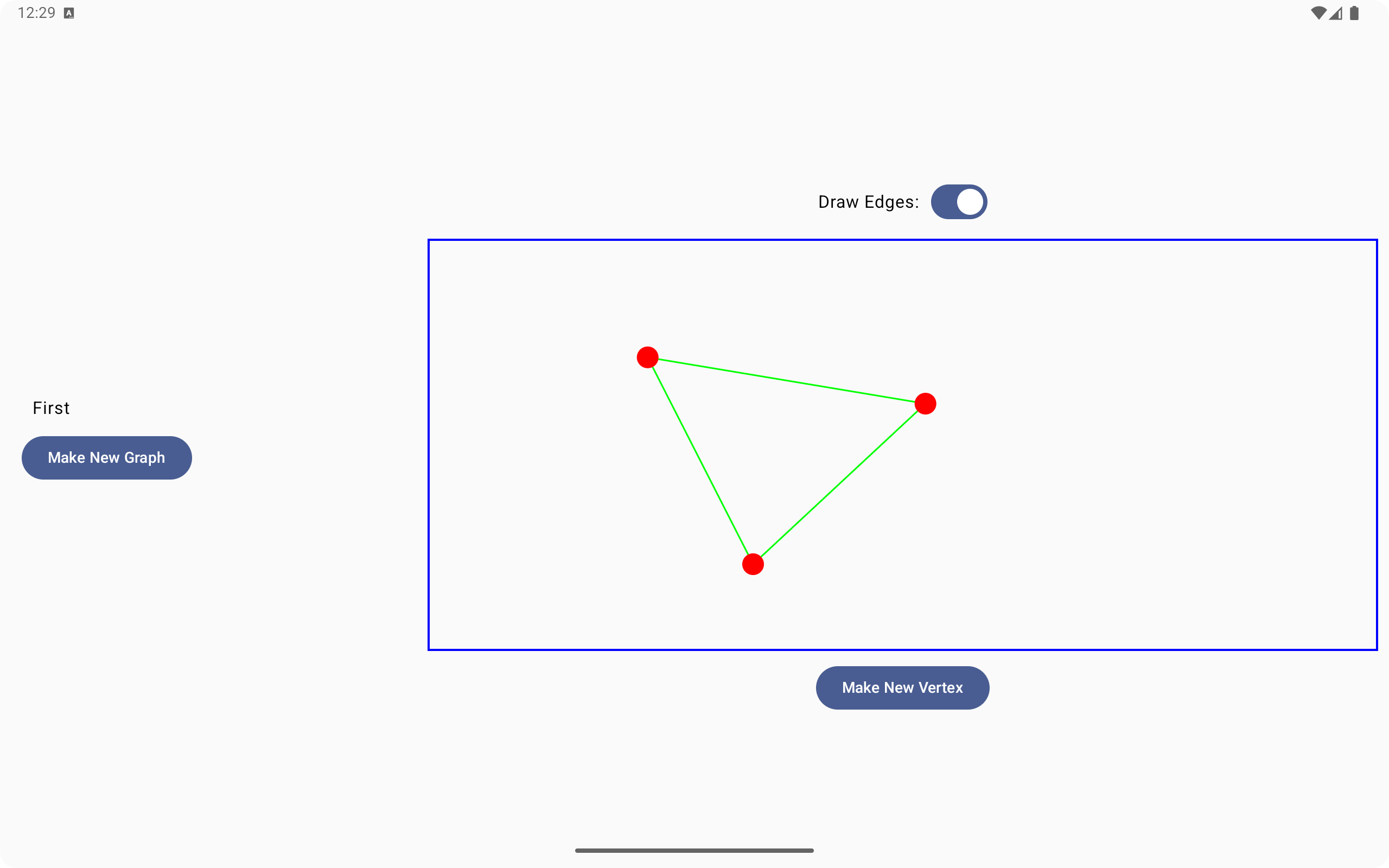
There is a lot going on in this example, so I have broken the lecture notes for this example into two parts. In this first lecture I am going to walk you through the construction of an initial prototype app that has only a subset of the features of the final app.
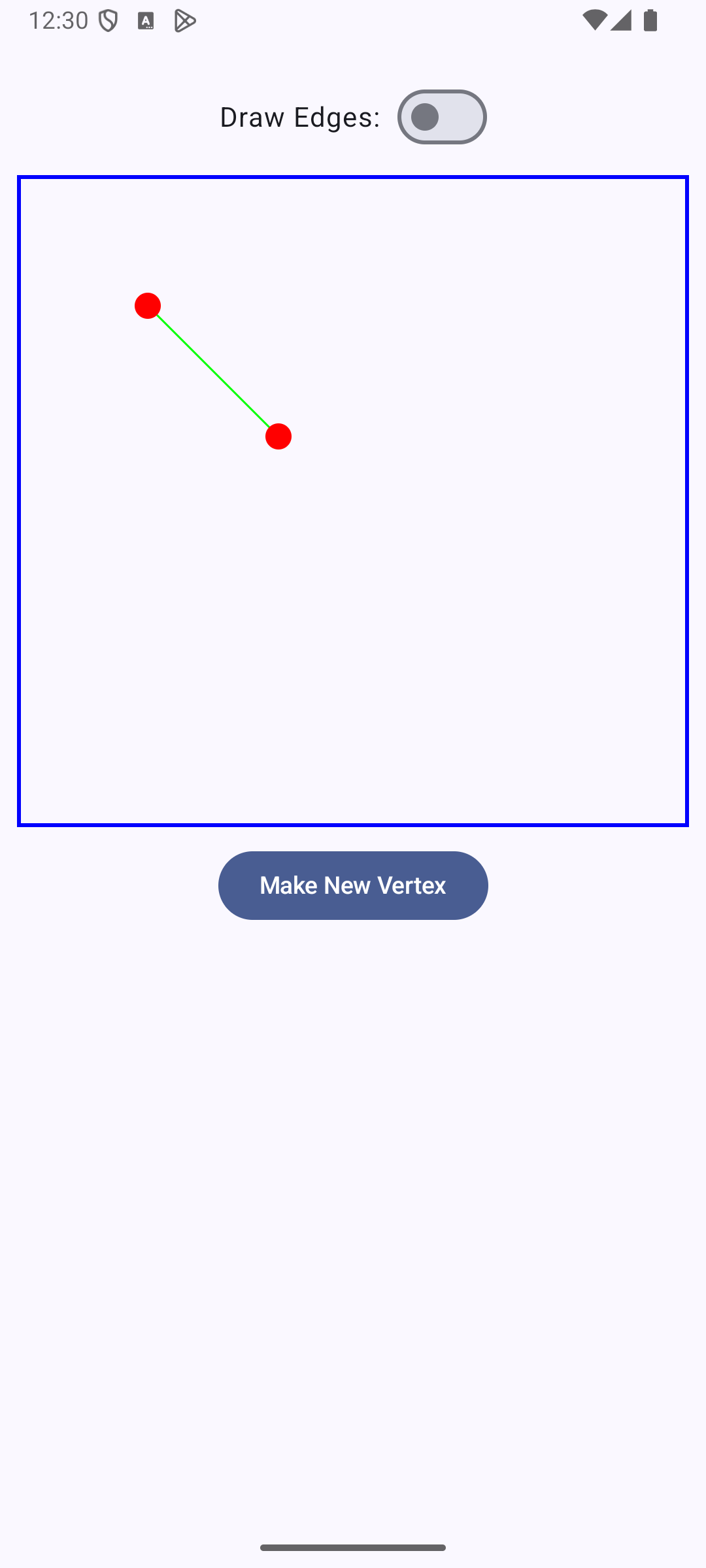
One of the most important features of both apps will be the use of the Jetpack Compose Canvas() element. This element makes it possible for us to create custom components that draw their own user interface and respond to user events such as taps and drags. The graph drawing component in these examples will be a custom Canvas() component.
Basics of the Canvas component
The basic structure of a Canvas element is pretty simple:
Canvas() {
  // Code to do drawing goes here
}
Like all components in Jetpack Compose, the Canvas element has a body closure in which we are expected to put code. In the specific case of the Canvas component the body closure will have implicit access to an object of type DrawScope. This object provides a collection of drawing methods, such as drawLine() and drawCircle(), that we can use to draw shapes into the Canvas.
To use these drawing methods we will also need to understand the coordinate system used for drawing, along with some associated data types. The coordinate system that DrawScopes use has its origin in the upper left hand corner of the drawing surface. The positive x axis runs to the right of the origin, while the positive y axis runs down from the origin. Location, size, and distance measures are all given in the Float data type. The Offset class is used to describe locations in the drawing surface. An offset has two member variables, x and y.
Much more information about the DrawScope class is available in the official documentation.
Making our own drawing objects
Since our eventual goal is to construct a component that allows users to create their own graphs we will want to move away from having fixed drawing code in our Canvas. Instead, we will construct an app in which users can create their own shape objects and have the Canvas draw whatever shapes the user wants.
The first step in doing this is to define our own set of shape objects:
class Vertex(var centerX : Float,var centerY : Float) {
    val radius = 20.0f

    fun drawIn(scope: DrawScope) {
        scope.drawCircle(color = Color.Red, radius = radius,
            center = Offset(x = centerX , y = centerY))
    }

    fun containsPoint(pt : Offset) : Boolean {
        val deltaX = (centerX - pt.x)
        val deltaY = (centerY - pt.y)
        val r = 1.5*radius
        val distSquared = deltaX*deltaX + deltaY*deltaY
        return distSquared < r*r
    }
}

class Edge(var origin : Vertex,var dest : Vertex) {
    fun drawIn(scope: DrawScope) {
        scope.drawLine(
            color = Color.Green,
            start = Offset(x = origin.centerX, y = origin.centerY),
            end = Offset(x = dest.centerX, y = dest.centerY),
            strokeWidth = 3.0f
        )
    }
}
The most important thing to notice about these objects is that they contain drawing methods that will enable the objects to draw themselves given a DrawScope to work with.
The shapes that we create will be stored in a model class:
class GraphModel : ViewModel() {
    var vertices = mutableStateListOf<Vertex>()
    var edges = mutableStateListOf<Edge>()
    var dragging = mutableStateOf<Vertex?>(null)
    var start = mutableStateOf<Vertex?>(null)

    init {
        val x1 = 200.0f
        val x2 = 400.0f
        val v1 = Vertex(centerX = x1,centerY = x1)
        val v2 = Vertex(centerX = x2,centerY = x2)
        vertices.add(v1)
        vertices.add(v2)
        edges.add(Edge(origin = v1, dest = v2))
    }

    fun makeVertex(center : Offset) {
        vertices.add(Vertex(centerX = center.x,centerY = center.y))
    }

    fun startDrag(pt:Offset) {
        for (v in vertices) {
            if(v.containsPoint(pt)) {
                dragging.value = v
            }
        }
    }

    fun continueDrag(pt:Offset) {
        if(dragging.value != null) {
            val v = dragging.value!!
            v.centerX = pt.x
            v.centerY = pt.y
        }
    }

    fun endDrag(pt:Offset) {
        dragging.value = null
    }

    fun startDraw(pt:Offset) {
        for (v in vertices) {
            if(v.containsPoint(pt)) {
                start.value = v
            }
        }
    }

    fun endDraw(pt:Offset) {
        if(start.value != null) {
            val s = start.value!!
            for (v in vertices) {
                if(v.containsPoint(pt) && v != s) {
                    val newEdge = Edge(origin = s,dest = v)
                    edges.add(newEdge)
                    break
                }
            }
        }
        start.value = null
    }
}
Note the two properties vertices and edges: these lists store the objects we are going to be drawing.
Users will create these objects by tapping and dragging in the Canvas component. Most of the code that you see in the shape classes and the GraphModel class supports these user interactions. In the next section I will explain in detail how interactive drawing in the Canvas will work.
Handling dragging events
The user will be using our Canvas component to draw graphs with vertices and edges in them. Here are some of the user interactions our Canvas will need to support:
- Users will be able to create new vertices by clicking a button below the canvas. This will place a new vertex in the picture at a default start location.
- Users can drag vertices around in the Canvas to reposition them.
- Users can also use dragging interactions to draw edges that connect vertices. To do this, the user will switch the app to edge drawing mode and then drag from one vertex to another to construct an edge.
To enable all of these interactions we will attach modifiers to the Canvas that gives the Canvas the ability to respond to tap and drag events. Here is the code for the component that contains the Canvas with this event handling code included.
@Composable
fun CanvasDemo(graph : GraphModel,modifier: Modifier = Modifier) {
    val vertices = remember { graph.vertices }
    val drawingEdge = remember { mutableStateOf(false)}
    val startOffset = remember { mutableStateOf(Offset.Zero) }
    val curOffset = remember { mutableStateOf(Offset.Zero) }

    fun startDrag(offset: Offset) {
        startOffset.value = offset
        curOffset.value = offset
        if(drawingEdge.value) {
            graph.startDraw(offset)
        } else {
            graph.startDrag(offset)
        }
    }

    fun continueDrag(dragAmount:Offset) {
        curOffset.value = Offset(x = curOffset.value.x + dragAmount.x,y = curOffset.value.y + dragAmount.y)
        if(!drawingEdge.value) {
            graph.continueDrag(curOffset.value)
        }
    }

    fun endDrag() {
        if(drawingEdge.value) {
            graph.endDraw(curOffset.value)
        } else {
            graph.endDrag(curOffset.value)
        }
        startOffset.value = Offset.Zero
        curOffset.value = Offset.Zero
    }

    Column(verticalArrangement = Arrangement.Center,
        horizontalAlignment = Alignment.CenterHorizontally, modifier = modifier) {
        Spacer(modifier = Modifier.height(20.dp))
        Row(
            horizontalArrangement = Arrangement.Start,
            verticalAlignment = Alignment.CenterVertically
        ) {
            Text("Draw Edges:")
            Spacer(modifier = Modifier.width(10.dp))
            Switch(
                checked = drawingEdge.value,
                onCheckedChange = { drawingEdge.value = it })
        }
        Canvas(modifier = Modifier.fillMaxWidth().height(400.dp).padding(10.dp).border(BorderStroke(2.dp, Color.Blue))
            .pointerInput(Unit) {
                detectTapGestures(onPress = { startDrag(it) })
            }
            .pointerInput(Unit){
                detectDragGestures(onDrag = {_,amount->continueDrag(amount)},
                    onDragEnd = {endDrag()})
            }) {
            for( edge in graph.edges) {
                edge.drawIn(this)
            }
            for( vertex in graph.vertices) {
                vertex.drawIn(this)
            }
            if(startOffset.value != curOffset.value && drawingEdge.value) {
                drawLine(
                    color = Color.Black,
                    start = startOffset.value,
                    end = curOffset.value,
                    strokeWidth = 1.0f
                )
            }
        }
        Button(onClick = { graph.makeVertex(Offset(x = 600f,y = 600f)) }) {
            Text("Make New Vertex")
        }
    }
}
Drag events are a special type of pointer input event that Jetpack Compose components can respond to. We set our Canvas up to respond to gestures by attaching two .pointerInput() modifiers to it. The body of these modifier should contain gesture recognizers. Since gesture recognizers are typically fairly complex I used the approach here of defining some helper functions to help manage the event handling logic.
The specific gesture we are going to be responding to here is a DragGesture, which will respond to drag events. Here is some additional information about how drag gestures work:
- A drag gesture starts when the user presses their finger on the screen and moves their figure a certain minimum distance called the touch slop.
- If we want to know where the drag actually started, we have to listen for an onPress tap gesture event. That event can tell us where the user first pressed their finger to the screen to start the drag.
- As the user moves their finger across the screen the system will start firing onDrag events periodically.
- When the user lifts their finger from the screen to end the drag the system will fire an onEnd event.
If you look at the code in the various pointerInput modifiers I set up here you will see that I made use of a set of helper functions to help use to respond to key events. These helper functions record important details as the events progress and send commands to the model class to tell it to move things around.
The logic that responds to drag events is a little complex. One problem is that drags can mean different things at different times. In this app there are two modes that the Canvas can be in: a mode in which a user can drag to move vertices and a mode in which a user can drag to draw an edge. The drawingEdge state variable acts as a switch between these two modes.
Another thing we have to manage in drag events is visual feedback for the user. We need to give the user a visual indication that their drag request is actually doing something. To provide this feedback during dragging I added a couple of state variables to our component, the startOffset and curOffset variables. Both of these variables use the Offset data type to describe locations in the drawing surface. When we run the drawing code in the body of the Canvas we will add code there to draw an extra line whenever these two variables differ from each other. This line gives visual feedback in the drawing process whenever we are dragging to draw new edges.
To fully understand the logic involved in responding to drag events you should study the code in the helper functions here, along with the logic in the model methods that these helper functions call. In particular, the model class maintains some additional member variables, dragging and start, that help it keep track of what is going on during drags. dragging will store a reference to the Vertex that the user is dragging around when we are in vertex dragging mode, while start records the location where drawing started when we are in edge drawing mode.