Implementing the full app
In this second set of lecture notes on the graph drawing program I am going to complete the drawing app. The final version of the app will be designed to run on an Android tablet, so this will also give us an opportunity to look at some design strategies that are best suited for tablets.
Here is what the finished app will look like:
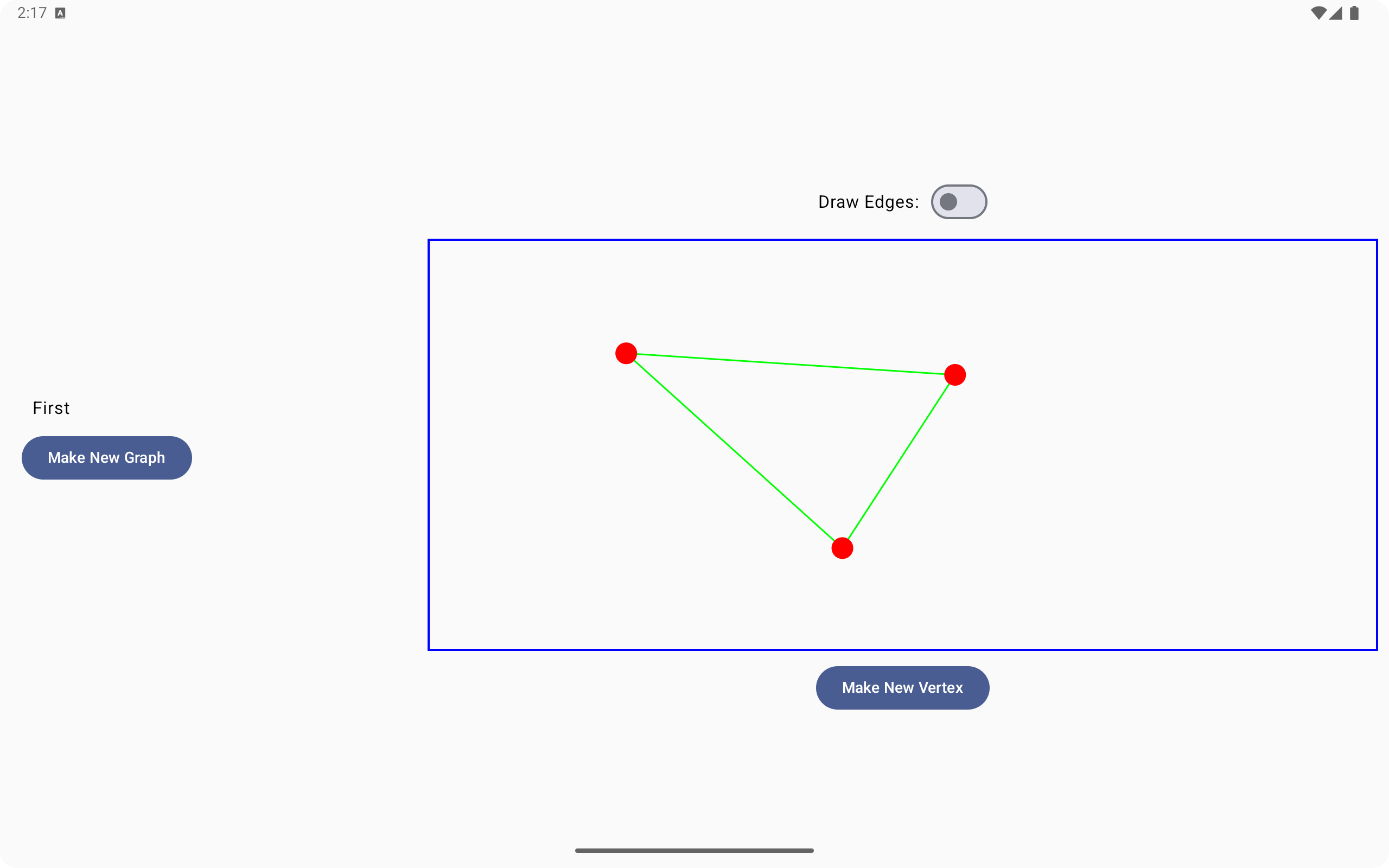
The app will add these new capabilities:
- The app will be able to store graphs in a database. This will make it possible to create an unlimited number of graph drawings.
- We are going to take full advantage of the extra space offered by the tablet display. This will enable us to both make larger drawings but also set up a navigation view off to the left that users can use to easily switch between drawings.
- We will also make the app respond gracefully to changes in orientation of the tablet.
Storing graphs in a Room database
Our first improvement is to make it easy to store our graphs in a database. We will set up a Room database for this purpose.
I have rewritten the Vertex and Edge classes from the previous version to make it easier to store these objects in a database. I have also introduced a new GraphInfo class that will represent a graph. This will give the ability to create an unlimited number of graphs and store them in the database.
Here is the code for the new versions of the graph classes.
const val radius = 20.0f

@Entity(tableName = "vertices")
class Vertex(@PrimaryKey(autoGenerate=true) val id : Int = 0,var centerX : Float, var centerY : Float, var graph : Int) {

    fun drawIn(scope: DrawScope) {
        scope.drawCircle(color = Color.Red, radius = radius,
            center = Offset(x = centerX , y = centerY))
    }

    fun containsPoint(pt : Offset) : Boolean {
        val deltaX = (centerX - pt.x)
        val deltaY = (centerY - pt.y)
        val r = 1.5*radius
        val distSquared = deltaX*deltaX + deltaY*deltaY
        return distSquared < r*r
    }
}

@Entity(tableName = "edges")
class EdgeInfo(@PrimaryKey(autoGenerate=true) val id : Int = 0,var origin : Int,var dest : Int,var graph : Int)

class Edge(var origin : Vertex,var dest: Vertex){
    fun drawIn(scope: DrawScope) {
        scope.drawLine(
            color = Color.Green,
            start = Offset(x = origin.centerX, y = origin.centerY),
            end = Offset(x = dest.centerX, y = dest.centerY),
            strokeWidth = 3.0f
        )
    }
}

@Entity(tableName = "graphs")
class GraphInfo(@PrimaryKey(autoGenerate=true) val id : Int = 0,var name : String)
One important aspect of this code has to do with the Edge class. The problem with the Edge class is that an edge contains object references to the two Vertex objects that an Edge connects. Unfortunately, the Room database system will not allow us to store object references in a database. To work around this problem I introduced a new EdgeInfo class that instead represents an edge as a pair of vertex ids. I will then add some code to make a list of Edge objects from a list of EdgeInfo objects that I pull from the database.
Notice also that both the Vertex class and the EdgeInfo class contain member variables that store the id number of the graph that these objects belong inside. When we load a GraphInfo object from the database and decide we want to work with that graph we can do a query to look up all of the vertices and edges that refer to that particular graph.
The next step in setting up the Room database is to set up the required interface for database operations. Here is the code for that interface.
@Dao
interface GraphDao {
    @Insert
    suspend fun addGraph(graph : GraphInfo)

    @Insert
    suspend fun addVertex(vertex : Vertex) : Long

    @Insert
    suspend fun addEdge(edge : EdgeInfo)

    @Update
    suspend fun updateVertex(vertex : Vertex)

    @Query("select * from graphs")
    suspend fun loadGraphs() : List<GraphInfo>

    @Query("select * from vertices where graph = :graph")
    suspend fun loadVertices(graph:Int) : List<Vertex>

    @Query("select * from vertices where id = :id")
    suspend fun findVertex(id:Int) : Vertex

    @Query("select * from edges where graph = :graph")
    suspend fun loadEdges(graph:Int) : List<EdgeInfo>
}

@Database(entities = [Vertex::class,EdgeInfo::class,GraphInfo::class], version = 1)
abstract class GraphDatabase : RoomDatabase() {
    abstract fun graphDao() : GraphDao
}
Notice the loadVertices() and loadEdges() methods: these make it easy to find the vertices and edges once we know the id number of the graph we want to work with.
To help with the process of turning EdgeInfo objects into Edge objects I have also provided a findVertex() method here that will help in looking for the Vertex that has a particular id.
Changes to the view model class
In this version of the app we will still have a GraphModel class. The main difference this time around as that the GraphModel will be working with a Room database.
Here is the code for the new GraphModel class.
class GraphModel(private val dao : GraphDao) : ViewModel() {
    var graphs = mutableStateOf<List<GraphInfo>>(listOf<GraphInfo>())
    var curGraph = mutableIntStateOf(0)
    var vertices = mutableStateOf<List<Vertex>>(listOf<Vertex>())
    var edges = mutableStateOf<List<Edge>>(listOf<Edge>())
    var dragging = mutableStateOf<Vertex?>(null)
    var start = mutableStateOf<Vertex?>(null)

    init {
        viewModelScope.launch {
            var graphList: List<GraphInfo>
            withContext(Dispatchers.IO) {
                graphList = dao.loadGraphs()
            }
            withContext(Dispatchers.Main) {
                graphs.value = graphList
            }
        }
    }

    fun setGraph(id : Int) {
        curGraph.intValue = id
        viewModelScope.launch {
            var vertexList : List<Vertex>
            withContext(Dispatchers.IO) {
                vertexList = dao.loadVertices(id)
            }
            withContext(Dispatchers.Main) {
                vertices.value = vertexList
            }
            var edgeInfoList : List<EdgeInfo>
            val edgeList = mutableListOf<Edge>()
            withContext(Dispatchers.IO) {
                edgeInfoList = dao.loadEdges(id)
                for(ei in edgeInfoList) {
                    val o = dao.findVertex(ei.origin)
                    val d = dao.findVertex(ei.dest)
                    edgeList.add(Edge(origin=o,dest=d))
                }
            }
            withContext(Dispatchers.Main) {
                edges.value = edgeList.toList()
            }
        }
    }

    fun makeGraph(name : String) {
        val gi = GraphInfo(name = name)
        viewModelScope.launch {
            var graphList: List<GraphInfo>
            withContext(Dispatchers.IO) {
                dao.addGraph(gi)
                graphList = dao.loadGraphs()
            }
            withContext(Dispatchers.Main) {
                graphs.value = graphList
            }
        }
    }

    fun makeVertex(center : Offset) {
        var v = Vertex(centerX = center.x,centerY = center.y,graph = curGraph.intValue)
        var id : Long
        viewModelScope.launch {
            withContext(Dispatchers.IO) {
                id = dao.addVertex(v)
                v = dao.findVertex(id.toInt())
            }
            withContext(Dispatchers.Main) {
                vertices.value += v
            }
        }
    }

    fun startDrag(pt:Offset) {
        for (v in vertices.value) {
            if(v.containsPoint(pt)) {
                dragging.value = v
            }
        }
    }

    fun continueDrag(pt:Offset) {
        if(dragging.value != null) {
            val v = dragging.value!!
            v.centerX = pt.x
            v.centerY = pt.y
        }
    }

    fun endDrag(pt:Offset) {
        if(dragging.value != null) {
            val v = dragging.value!!
            viewModelScope.launch {
                withContext(Dispatchers.IO) {
                    dao.updateVertex(v)
                }
            }
            dragging.value = null
        }
    }

    fun startDraw(pt:Offset) {
        for (v in vertices.value) {
            if(v.containsPoint(pt)) {
                start.value = v
            }
        }
    }

    fun endDraw(pt:Offset) {
        if(start.value != null) {
            val s = start.value!!
            for (v in vertices.value) {
                if(v.containsPoint(pt) && v != s) {
                    val newEdge = Edge(origin = s,dest = v)
                    edges.value += newEdge
                    val ei = EdgeInfo(origin = s.id,dest=v.id,graph=curGraph.intValue)
                    viewModelScope.launch {
                        withContext(Dispatchers.IO) {
                            dao.addEdge(ei)
                        }
                    }
                    break
                }
            }
        }
        start.value = null
    }
}
Here are some important changes to note.
- Since we can now have many graphs I added a member variable that stores a list of GraphInfo objects. Code in the
init()method will load that list of GraphInfo objects when the app starts up. - When the user switches to a new graph I will store the id number of the currently active graph in a member variable and then run some database queries to load the vertices and edges for that graph. The new
setGraph()method takes care of that for us. - An important bit of the logic in
setGraph()is code that loads the EdgeInfo objects for the graph in question and then turns each EdgeInfo object into an Edge object. - The
makeGraph()andmakeVertex()methods handle making new graphs and new vertices. - Since edges are going to be created as a side effect of dragging operations, the code for making a new edge is hidden in the
endDraw()method. To make a new edge we make an Edge object and add it to the list of Edges and then also make an EdgeInfo object that goes in the database.
Working with a NavigableListDetailPaneScaffold
To take full advantage of the tablet platform we are going to be working with a new top level component that is well-suited to the platform. The top level component in our app is going to be a NavigableListDetailPaneScaffold. Here are the key features of that component:
- A NavigableListDetailPaneScaffold contains two sub-parts: a list pane and a detail pane.
- NavigableListDetailPaneScaffold also helps us with navigation. It is designed to work hand-in-hand with a special navigator object to manage navigation for us.
- The NavigableListDetailPaneScaffold is also adapts nicely to different configurations. Although the app is designed to be run on a tablet in landscape orientation, if the user rotates the tablet to potrait orientation or runs the app on a phone with less screen space the view will adapt gracefully.
Here is the code for our top level view:
@Composable
@OptIn(ExperimentalMaterial3AdaptiveApi::class)
fun CanvasApp(gm : GraphModel) {
    val navigator = rememberListDetailPaneScaffoldNavigator<Any>()
    NavigableListDetailPaneScaffold(
        navigator = navigator,
        listPane = { GraphList(gm, onClick = { gi -> navigator.navigateTo(
            ListDetailPaneScaffoldRole.Detail, content = gi) }) },
        detailPane = { GraphDetailPane(gm,navigator) }
    )
}
The roles of the list view and the detail view are handled by the GraphList and GraphDetailPane components. Here is the code for those two:
@Composable
fun GraphList(gm : GraphModel,onClick : (GraphInfo)->Unit) {
    val showDialog = remember { mutableStateOf(false) }
    Column(verticalArrangement = Arrangement.Center, modifier = Modifier.padding(20.dp)) {
        gm.graphs.value.forEach { gi ->
            Text(gi.name,
                modifier = Modifier.padding(10.dp).clickable(onClick = { onClick(gi) }))
        }
        Button(onClick = { showDialog.value = true }) {
            Text("Make New Graph")
        }
    }
    if(showDialog.value) {
        NameDialog(
            onConfirm = {
                gm.makeGraph(it)
                showDialog.value = false
            },
            onDismiss = { showDialog.value = false })
    }
}
@Composable
@OptIn(ExperimentalMaterial3AdaptiveApi::class)
private fun GraphDetailPane(gm : GraphModel,navigator: ThreePaneScaffoldNavigator<Any>) {
    val graph : GraphInfo? = navigator.currentDestination?.content as GraphInfo?
    if(graph != null) {
        gm.setGraph(graph.id)
        CanvasDemo(gm)
    } else {
        Text("Make a selection.")
    }
}
Here are some important things to notice here:
- The GraphList displays a list of GraphInfo objects. For each GraphInfo object we show a Text component that displays the name of the graph. The Text component is clickable, and when the user clicks it I invoke a callback function that tells the navigator to navigate to that graph.
- We pass that navigator to the GraphDetailPane. The first thing that pane will do is look inside the navigator to read the GraphInfo object that tells it which graph to display. We then tell the GraphModel to work with that graph and then display a CanvasDemo() component that will handle the work of displaying that graph.
- The CanvasDemo() component is copied from the first version of the app with no significant changes. It fits nicely into the detail pane in this version of the app.
- Below the list of graphs I put a "Make New Graph" button. Clicking that button causes a dialog to pop up that will ask the user to enter a name for the new graph. If the user enters a name and accepts the dialog we will tell the GraphModel to make a new graph with that name.
Another useful characteristic of the NavigableListDetailPaneScaffold is its adaptability. You can experiment with rotating the tablet in the emulator or even running this new app on a phone instead of a tablet to see how this component reacts to different configurations. In situations where space is limited the list pane will slide off the edge of the screen to make room for the detail pane. The user can swipe back from the edge to pull the list view back out into view like a drawer when they need to access it.