Basics of Relational Databases and SQL
In CMSC 250 you were introduced to the basics of relational databases and SQL. Since you may have taken 250 as much as two years ago, we are going to start with a quick refresher course on databases and SQL.
Tables
Relational databases are composed of tables. A table consists of rows and columns. The columns, or fields, have names and data types. For example, here is table of users in an email application.

Common data types used in relational databases include INT, VARCHAR, and DOUBLE. The VARCHAR datatype is used for variable length strings, and comes with a length limit. For example, the iduser field in the table above has a maximum length of 36. Other data types include TEXT, which is used for blocks of text of unlimited size, and time related data types such as DATE, TIME, and TIMESTAMP (which includes both a date and a time).
Columns can also have attributes, which are indicated by the checkboxes in the example above. Here are the meanings of some of the more important attributes.
| Attribute | Abbreviation | Meaning |
|---|---|---|
| Primary Key | PK | This column is the unique identifier |
| Not NULL | NN | This column is not allowed to have a NULL value |
| Unique | UQ | Values in this column must be unique |
| Auto Increment | AI | The database system will automatically assign values |
In most tables there is a column that acts as a primary key. This column is the unique identifier for entries in the table, and is widely used to implement relations between tables.
Relations
A relational database typically consists of multiple tables that are inter-related. For example, here is a second table in the mail example, a table of email messages.
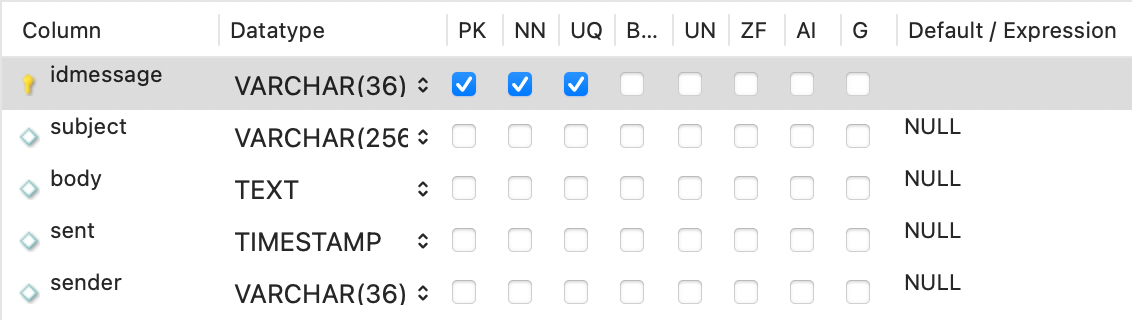
An example of a relation here is the relationship between a message and the user who sent it. The sender field in the table of messages will contain the id string for the sender, which refers to a row in the table of users.
Relations come in four basic types: one-to-one, one-to-many, many-to-one, and many-to-many. The relation of messages to senders here is a one-to-many relation in which one sender can send many messages.
Storing lists
An important restriction in relational databases is that each cell in a table can contain only a single value. To implement lists we typically use a list table. An example of this is a list of recipients for an email message. A single message can have multiple recipients, so the recipients for messages have to be stored in a separate table:

For each recipient that a message has we will add a row to this table that stores the id of the message and the id of the user this message will get sent to. To have multiple recipients for a given email message we will simply add multiple rows to this table, one per recipient.
SQL
To interact with a relational database we will use a specialized language, SQL. SQL has four basic statements: SELECT, INSERT, UPDATE, and DELETE.
The SELECT statement is used to retrieve information:
select name, iduser from mail.user where name='jgregg';
In its most basic form the SELECT statement can be used to fetch rows from a single table. Since information is very often spread across multiple rows we frequently will have to use joins to merge several tables together before retrieving information.
select subject, sender from mail.message join mail.recipient on mail.message.idmessage = mail.recipient.message where recipient = 'd4ae1063-a774-4d31-b37f-b84eb96c1913'
The INSERT statement is used to add new rows to a table:
insert into mail.user(iduser,name) values ('894dc5b3-8fd0-484c-b299-4fd54c496e27','test')
The UPDATE statement is used to modifiy existing entries:
update mail.user set password='password123' where name='test';
The DELETE statement is used to remove rows from a table:
delete from mail.user where name='test';
This quick summary is meant just as a quick reminder of some aspects of databases that we will be working with in this course. We will get into much greater detail on all of these things as we get deeper into examples later in the course.
Database design - an example
Once we start to move beyond basic examples of databases designing the tables for a database application will get more challenging. As a first example of the kind of thinking that goes into designing a database for an application we will now launch into an extended example of designing the tables for a moderately complex application.
The application we are going to work on is the back end for a music streaming service like Spotify or Apple Music. The stream service will offer a library of tracks that users can stream.
The first step in designing a database is to identify the primary entities in the system we are modeling, along with their attributes and their relationships. This in turn will guide the design of the tables in our database.
In the streaming application the primary entities we will deal with are tracks. The first step is to identify a list of attributes that a track may have.
- Tracks have a title.
- Tracks are issued by an artist.
- Tracks are published by a record label.
- Tracks have a duration.
- For streaming purposes any given track may be associated with one or more digital files in which the track is encoded in a variety of different audio formats.
- Tracks have a genre.
- Tracks will be associated with releases, such as albums or EPs.
- A given track may appear on multiple releases. For example a track may appear originally on an EP, but then may be released again later on an album, and again later as part of a compilation.
- Tracks may also be released multiple times: popular tracks will sometimes be rereleased years after the original release in the form of remastered tracks.
- Tracks may also be released in multiple versions, including remixes. In the case of remixes the artist responsible for the remix will be credited along with the original artist who released the track. Tracks can also be released as multiple edits, such a shorter radio version, an album version, and a longer club version.
- Some tracks may originate as pre-release placeholders. These are tracks that the streaming service is not allowed to play until the official release date. Also, sometimes record labels will get into a dispute with the steaming service and the label will temporarily block the streaming service from playing the track.
- If our service will allow users to also purchase and download tracks we also have to assign a price to each track. Users can also purchase releases, so those will need to have a price as well.
- Users can favorite releases, which allows them to collect lists of favorites to make it easy to find tracks later for listening.
In thinking about tracks we have also started to identify a number of other entities that tracks are related to:
- Tracks are produced by artists.
- Tracks appear on one or more releases.
- Releases are published by labels.
- Releases will have associated artwork, so we will want to store a URL for the artwork image.
- Tracks can also appear on playlists that users have created.
- Tracks are stored on one or more files with differing audio formats.
- Since artists are typical compensated in part based on how many times their tracks are streamed, we have to keep a record of how many times a track was played in a given period of time. This means we have to track the plays.
- Users have a user name and a password. User accounts also have an expiration time. To unlock an expired account a user will have to pay for another month or year of service.
- Users can purchase tracks, so we have to record all of a user's purchases somewhere.
Once we have identified additional entities, we can start to make a list of their attributes.
- Artists have a name and a biography.
- Releases have a title, a release date, and optional descriptive text.
- A label has a name, a URL, and a location.
- Playlists are created by users and can be public or private.
- Files are associated with tracks and have an audio format and a file name.
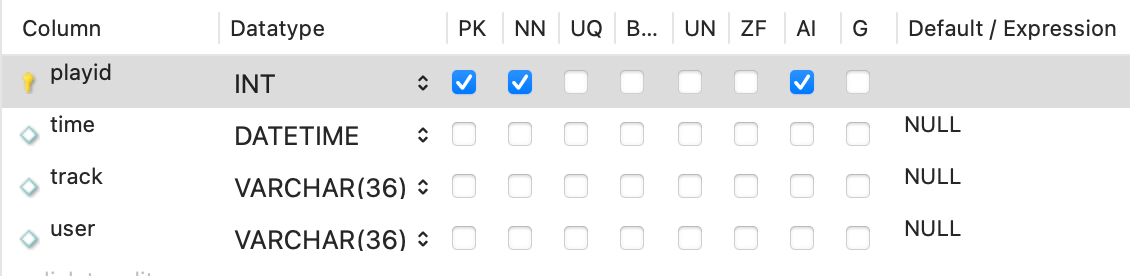
- A play is an instance of a track being requested by a user at a particular time.
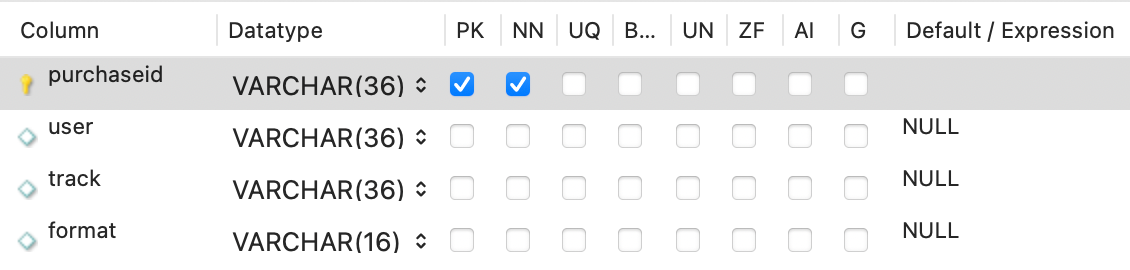
- Purchases have a price, a date, and a receipt number.
First draft of the database design
Now that we have gathered some information about the system we are building we can make a first draft of the database tables.
Before I show the tables, here is one remark about identifiers. For reasons that I will explain in a later lecture we will not want to use simple integer identifiers as primary keys for our tables. Instead, we will use a somewhat more secure mechanism called the globally unique identifier, or GUID, for each of our primary keys. A GUID is a moderately long sequence of characters and digits which is designed to be unique and hard to guess, such as the string '894dc5b3-8fd0-484c-b299-4fd54c496e27'.
Here now are the tables for our system.
The starting point for our system is the tracks table, where all tracks are listed. A track's duration is listed in seconds and its price is listed in pennies.
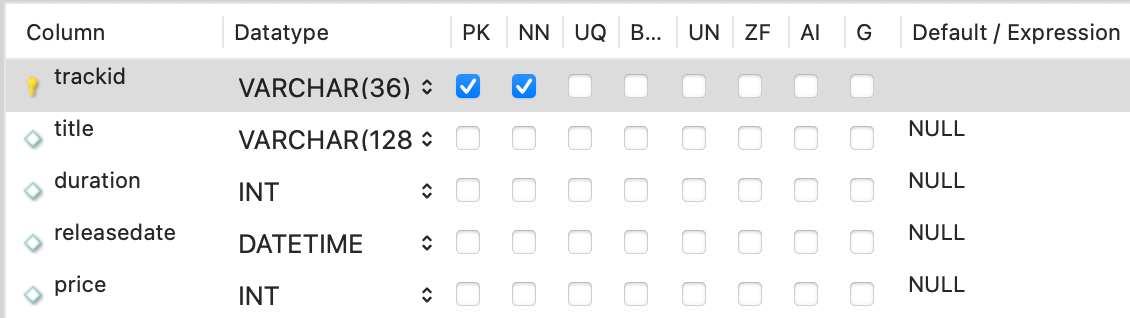
Note that this table does not list the artist or the release for a given track. That information is stored in other tables.
Information about releases is stored in the releases table. Releases are associated with artists and labels, so those links are stored in this table. Each release has optional descriptive text and a URL for an artwork file that will be stored in file somewhere.
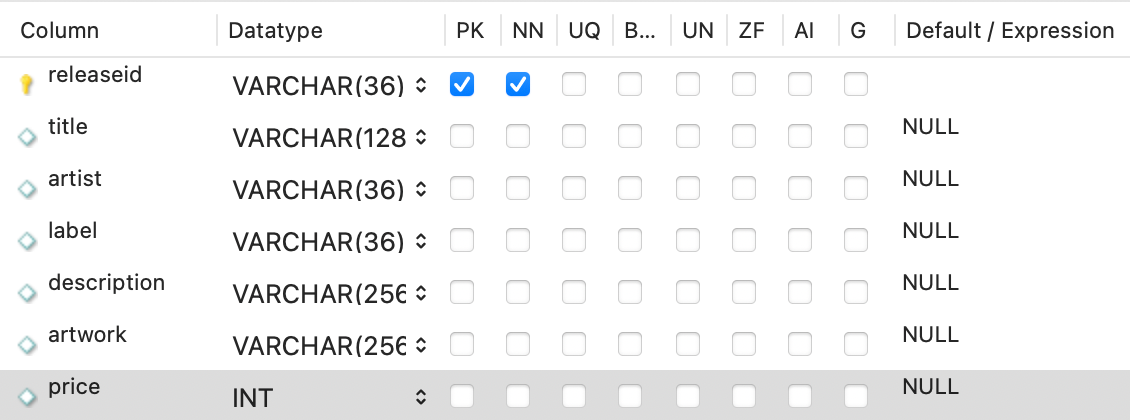
The list of tracks associated with a release is stored in a separate table, release_tracks.

This type of table is called an association table. More specifically this table implements a many-to-many association between releases and tracks. A typical release contains many tracks, and a given track may appear in multiple releases. Each such association also has a time associated with it that records when that particular track in the release can start to be played.
Information about artists and labels are stored in the artists and labels tables, respectively.
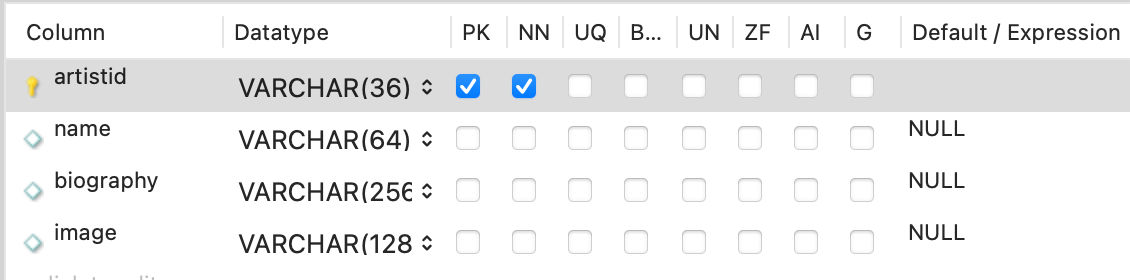
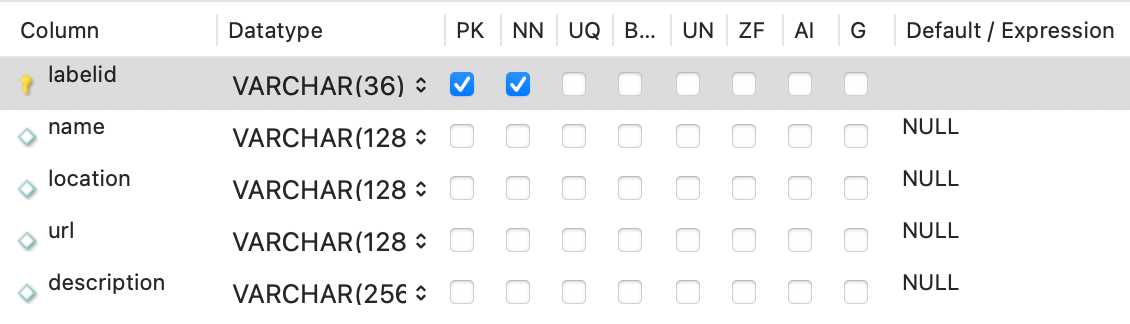
The users table contains basic information about users.
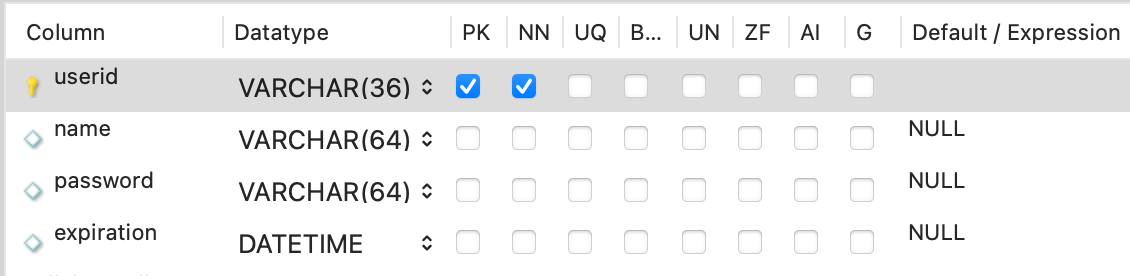
Users can favorite releases. The information about which users have favorited which releases is stored in the favorites table.

Playlists are represented by a couple of tables. The playlists table contains information about each playlist, and the playlist_tracks table records which tracks appear in which playlists.
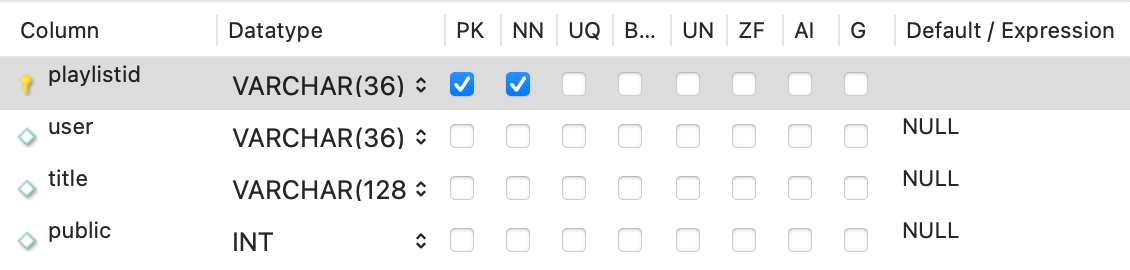

The files table contains information about the physical files where the tracks are stored. A given track may be available in several different audio formats - each separate format is stored as a separate file.
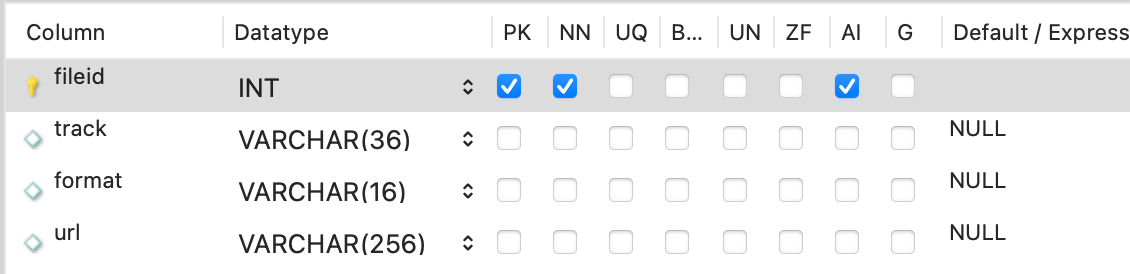
Users of our service will have the option to purchase releases and individual tracks. Purchasing a track gives the user the right to download the given track for offline listening.
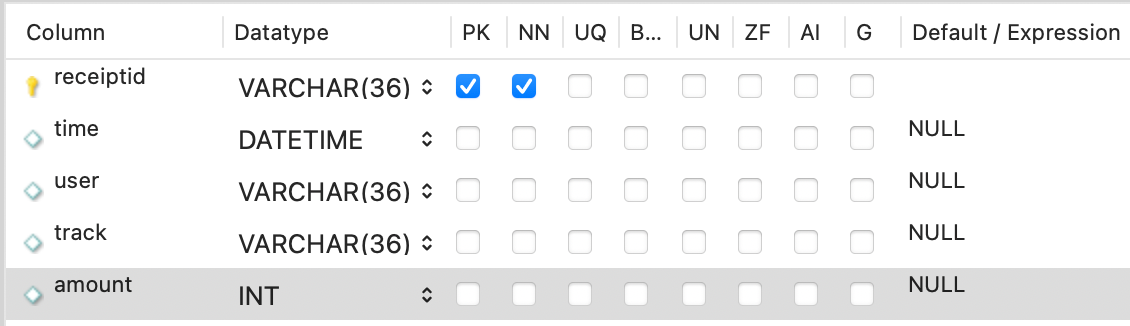
Purchases generate a receipt. Receipts are used to compute payments that go to the record label.
The plays table keep track of what users played what tracks. This is used to generate compensation for the labels and to have a record of which tracks were most popular in a given period of time.
Attributes and Relations
Database tables contain two types of information: attributes and relations. Most database tables represent particular entities in our system. The attributes of those entities are listed directly in the table. Some tables also contain information about the relations between an entity and other entities.
For example, here is the releases table:
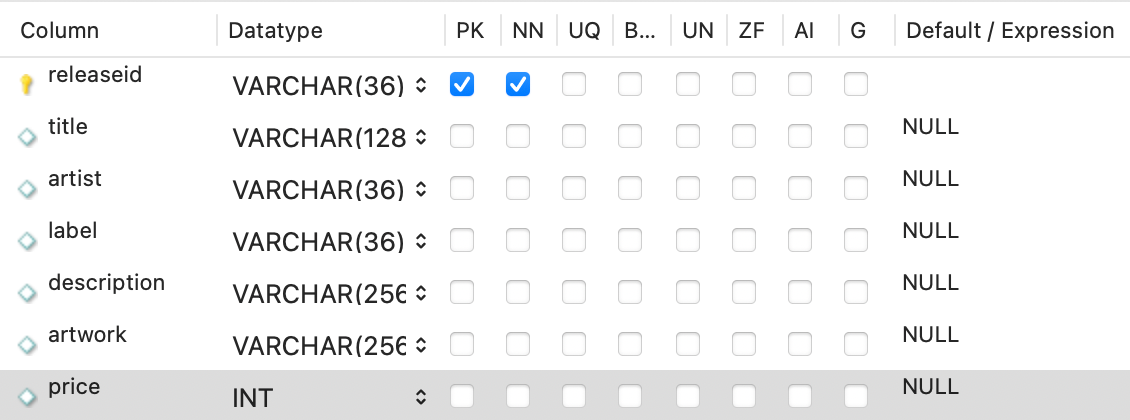
A release has a primary key, releaseid. A release has attributes title, description, artwork, and price. Releases are related to artists and labels: these relations are stored as foreign keys in this table that refer to entries in the artists and labels tables.
This particular approach to linking tables allows for one-to-many relationships. Each label publishes multiple releases, and each artist will have multiple releases.
many-to-many relations are implemented via separate association tables. The playlist_tracks table is an example of a table that implements this type of relation. A given playlist can contain many tracks, and a given track can appear on many playlists.

Adding some data
The next step after creating the structure of our database is to add some test data. Once we have data in our database can play around with writing some SQL code to extract information from our database.
My first step in creating sample data is to ask an AI system to generate some sample data for us. This is one of the things that AI systems can do very well, provided we give the system enough guidance. To ask an AI system to generate data for us we have to do the following steps.
- Our prompt has to provide the appropriate context. The prompt should state that we are developing an example database that will model a music streaming application.
- The prompt should include information about the structure of the tables we are working with. We can provide this information in the prompt by using the database export feature of the MySQL workbench to dump SQL table definitions for our tables. We can then upload the definitions of tables that we need as part of the prompt.
- We ask the AI system to generate SQL insert statements that we can paste into the workbench.
- We provide clarification as needed. For example, the AI needs to know that in the tables where the primary key has type VARCHAR(36) we expect to see globally unique identifier strings. For the password field in the users table we also need to tell the system that we will not be storing plain text passwords; instead, we will be storing salted and hashed passwords.
This gives us some good sample data to start with.
One other thing I did was to generate some fake data on plays. This task was too complex to trust an AI to handle, so I instead wrote a short Java program that would use JDBC to generate some fake data. Here is the code for that program:
package edu.lawrence.firstsql;

import java.sql.*;
import java.util.ArrayList;
import java.util.List;
import java.sql.Timestamp;
import java.util.Random;


public class SimpleJDBC {
    public static void main(String[] args)
    throws SQLException, ClassNotFoundException {
    // Load the JDBC driver
    Class.forName("com.mysql.cj.jdbc.Driver");
    System.out.println("Driver loaded");

    // Establish a connection
    Connection connection = DriverManager.getConnection
      ("jdbc:mysql://localhost:3306/music?user=student&password=Cmsc250!");

    System.out.println("Database connected");

    // Create a statement
    Statement statement = connection.createStatement();

    // Get the list of track ids
    ResultSet resultSet = statement.executeQuery("select trackid from tracks");
    List<String> tracks = new ArrayList<String>();
    while (resultSet.next())
      tracks.add(resultSet.getString(1));

    // Get the list of user ids
    resultSet = statement.executeQuery("select userid from users");
    List<String> users = new ArrayList<String>();
    while (resultSet.next())
      users.add(resultSet.getString(1));


    // Generate a bunch of fake plays.
    Random rnd = new Random();
    Timestamp startRange = Timestamp.valueOf("2026-03-01 00:00:00");
    long time = startRange.getTime();
    for(int n = 0;n < 100;n++) {
        // Bias the randomly selected track number toward the low end of the range
        // That way we get a more lopsided distribution of played tracks.
        int trackRange = rnd.nextInt(tracks.size());
        if(trackRange < 5)
            trackRange = 5;
        int trackNum = rnd.nextInt(trackRange);
        String trackID = tracks.get(trackNum);
        // Select a user at random
        int userNum = rnd.nextInt(users.size());
        String userID = tracks.get(userNum);

        // Choose a randome spacing between play times.
        time += rnd.nextLong(5000000);
        Timestamp ts = new Timestamp(time);
        String tStr = ts.toString();

        // Insert a fake play in the plays table.
        String sql = "insert into plays(time,track,user) values(\"" +
                tStr + "\",\"" +
                trackID + "\",\"" +
                userID + "\")";
        statement.execute(sql);
    }

    // Close the connection
    connection.close();
  }
}
Some SQL statements
The next step is to do some experiments in extracing data from the database. This will give us a little bit of practice writing SQL code.
To extract data from the database we write SQL select statements. These can range from simple statements that pull data from a single table, all the way up through more complex statements that aggregate data in sophisticated ways.
The first basic example is to pull simple data from a single table. For example, suppose we wanted to generate a list all of the releases from a given label. The first step is to pull the label's id from the labels table.
SELECT labelid FROM labels where name = 'Pacific Wave';
This returns the result
9288c3f4-2680-4187-894a-0a0404021f92
With that id we can find the titles of all releases from that label:
SELECT title FROM music.releases where label='9288c3f4-2680-4187-894a-0a0404021f92';
This returns the result
The Emerald City LP
Another way to achieve the same result is to do a join between the labels and releases tables:
SELECT title FROM labels join releases on labelid = label where name = 'Pacific Wave';
If you want, you can also attach the table names to the field names in the query:
SELECT releases.title FROM labels join releases on labels.labelid = releases.label where labels.name = 'Pacific Wave';
The SQL group by clause allows us to aggregate table data. For example, we can make a list of the most popular tracks from the plays table:
select track, count(track) as plays from plays group by track order by plays desc;
The group by clause groups rows that share the same track number together. We can then use aggregation functions such as count() to provide summary information. For this example I also used the order by clause with the descending (desc) option to order the results in order of decreasing number of plays.
The track ids in the last example are not particularly meaningful. To display the track names instead we can mix a table join into our query:
select title, count(track) as plays from plays join tracks on plays.track=tracks.trackid group by track order by plays desc;
These examples should give you sense for the type of SQL statements we will be working with in this course. If you need to refresh your understanding of how joins and the group by clause work, you can ask your favorite AI to explain these to you.
Example database files
Click the button at the top of these lecture notes to download the database dump for the final version of the example database. If you need help using the MySQL workbench to import these files, please ask me for assistance.